
SMA Bahasa Inggris: Pertanyaan, Jawaban, Latihan Soal & Pembahasan
Urutkan
Diandra D
10 Agustus 2023 01:23

0

Jongdi J
10 Agustus 2023 01:23
0
Diandra D
10 Agustus 2023 01:20
1
Okedia O
10 Agustus 2023 01:20
1
Diandra D
10 Agustus 2023 01:20
1
Bella B
10 Agustus 2023 01:20
1
Bella B
10 Agustus 2023 01:20
1
Okedia O
10 Agustus 2023 01:20
1
Bella B
10 Agustus 2023 01:20
0
Fill in the blanks with the right word. Don’t forget to change the verbs into past tense when necessary.
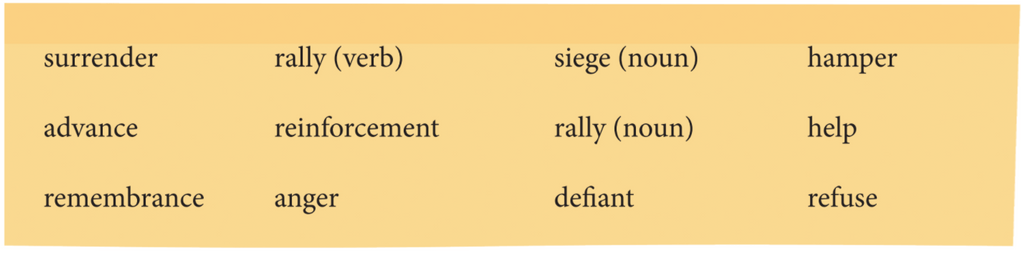
Priski’s mother told her to drop out from school because Priski’s father died last month. Priski ____ that because she knows that education is important for her future. She ____ her mother earns money by making some snack that she sells in the school canteen every day.
Pembahasan:
2
4.5
Complete the sentences. Choose the right words and change them into the simple past or present tense according to the context of the sentences.
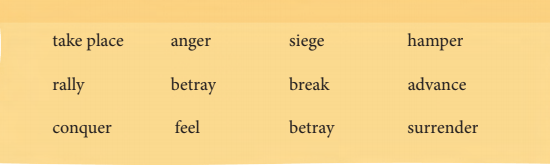
Never _________ best friends for our own advantage because best friends are like precious treasure.
Pembahasan:
1
5.0
Complete the sentences. Choose the right words and change them into the simple past or present tense according to the context of the sentences.
The robber_________ to surrender, but the police persuaded them to give up.
Pembahasan:
1
4.8
Complete the sentences. Choose the right words and change them into the simple past or present tense according to the context of the sentences.
The ceremony in remembrance of our founding fathers and mothers ____ in the training field. The ceremony was a tribute to them.
Pembahasan:
2
4.7
Complete the following sentences using the words in the box.
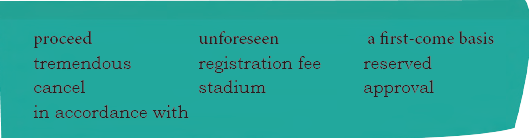
This restaurant is full. We cannot get any seat as all the tables have been ____.
Pembahasan:
1
4.4
How to Operate Photoshop: Tutorial for Beginners
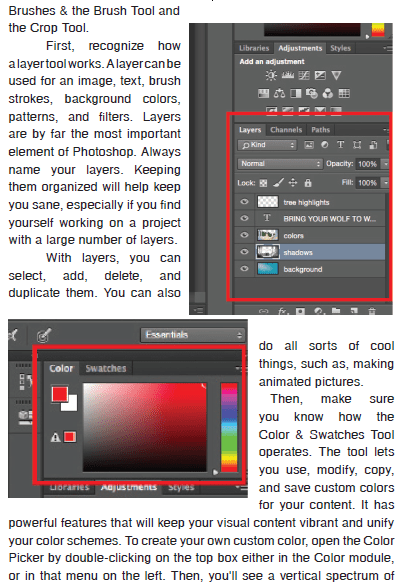
When you open Photoshop for the first time, it's easy to click around in confusion for a minute and then reach for your freelancer's phone number instead. With a little help, you can easily teach yourself how to use it to create beautiful, compelling graphics. All it takes is an introduction to core elements. To get you started, you need to understand how the five most important Photoshop tools work. The five tools are the Layer Tool, the Color & Swatches Tool, the Custom Fonts and the Text Tool, Custom Brushes & the Brush Tool and the Crop Tool.
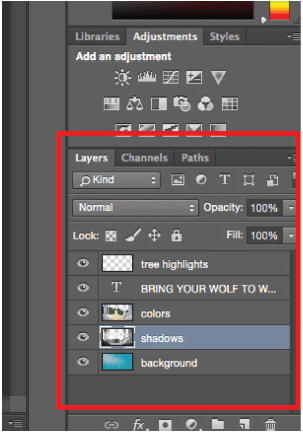
First, recognize how a layer tool works. A layer can be used for an image, text, brush strokes, background colors, patterns, and filters. Layers are by far the most important element of Photoshop. Always name your layers. Keeping them organized will help keep you sane, especially if you find yourself working on a project with a large number of layers.
With layers, you can select, add, delete, and duplicate them. You can also do all sorts of cool things, such as, making animated pictures.
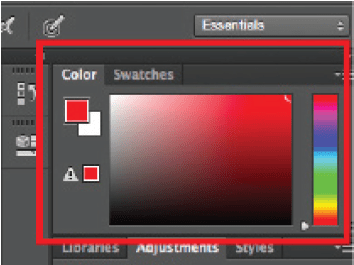
Then, make sure you know how the Color & Swatches Tool operates. The tool lets you use, modify, copy, and save custom colors for your content. It has powerful features that will keep your visual content vibrant and unify your color schemes. To create your own custom color, open the Color Picker by double-clicking on the top box either in the Color module, or in that menu on the left. Then, you'll see a vertical spectrum of color with a slider on it, which you can adjust to create your own custom color.

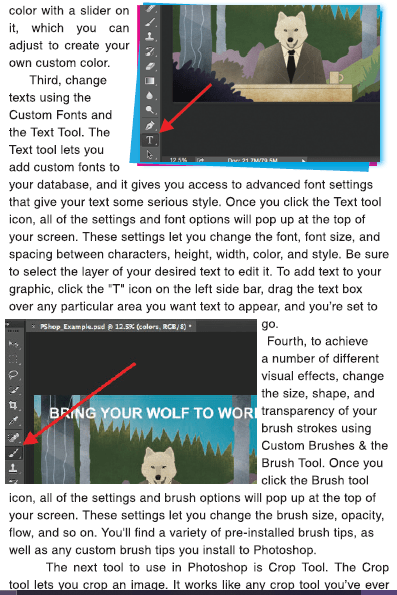
Third, change texts using the Custom Fonts and the Text Tool. The tools let you add custom fonts to your database, and it gives you access to advanced font settings that give your text some serious style. Once you click the Text tool icon, all of the settings and font options will pop up at the top of your screen. These settings let you change the font, font size, and spacing between characters, height, width, color, and style. Be sure to select the layer of your desired text to edit it. To add text to your graphic, click the "T" icon on the left side bar, drag the text box over any particular area you want text to appear, and you're set to go.
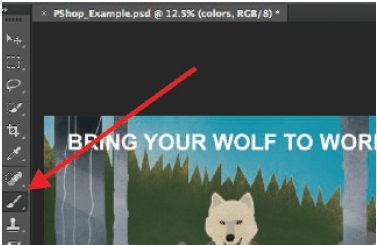
Fourth, to achieve a number of different visual effects, change the size, shape, and transparency of your brush strokes using Custom Brushes & the Brush Tool. Once you click the Brush tool icon, all of the settings and brush options will pop up at the top of your screen. These settings let you change the brush size, opacity, flow, and so on. You'll find a variety of pre-installed brush tips, as well as any custom brush tips you install to Photoshop.
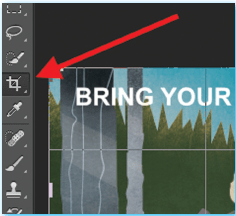
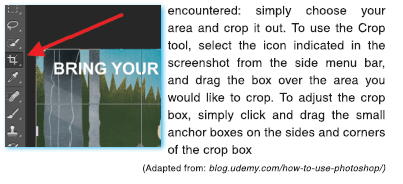
The next tool to use in Photoshop is Crop Tool. The Crop tool lets you crop an image. It works like any crop tool you've ever encountered: simply choose your area and crop it out. To use the Crop tool, select the icon indicated in the screenshot from the side menu bar, and drag the box over the area you would like to crop. To adjust the crop box, simply click and drag the small anchor boxes on the sides and corners of the crop box.
(Adapted from: blog.udemy.com/how-to-use-photoshop/)
Answer the following questions by referring to the text about photoshop above.
If you want to show only part of your picture, what tool will you use?
Pembahasan:
1
5.0
Read the text about photoshop below.
Answer the following questions by referring to the text about photoshop above.
How can you customize your own color in the Photoshop?
Pembahasan:
6
5.0
Read and skim the text. Read and skim each paragraph in the reading text about how to breed leopard geckos below. Then, answer the following question.
How to Breed Leopard Geckos
Leopard geckos could be easy to breed for some, but difficult for others. In this article, you will see the simplest way to breed leopard geckos.
Things you'll need:
- Cage for geckos (20 gallon for two, 10 gallon more for each additional female)
- Laying box (a plastic cintainer filled with damp moss for the female to lay in)
- Incubation medium (usually perlite)
- Lots of crickets dusted with calcium for egg growth
- Very small crickets for the babies
Steps:
1. Get a male and female leopard gecko.
The males have hemipenal bulges below the vent whereas females do not. Males and females both have a V-shaped row of scales above the vent but only the male's scales here are hollow and produce wax. This wax is for scent marking their territory.
2. Prepare a large cage for the male and female to live in together.
Geckos can be kept together without the need to separate them unless you see major aggression. It is sometimes normal when first introducing a male and female for there to be a little squabbling, but this usually stops within the first week. Breeding should occur within a week.
For a pair you will need at least a 20 gallon long tank. You may also choose to house one male with 4-5 females; add 10 gallons of space for additional gecko.
If you see major drama/fighting, separate the pair. You'll want to confirm they are not both males. If one male and one female, you can reintroduce them again later.
3. Get the incubator ready for the eggs and provide a lay box.
You can use a plastic sandwich cintainer with a lid for this purpose. Cut an entry hole on one side and fill it with damp moss (this can be used as the moist hide too).
4. Ready the laying box to put in the cage.
Females dig to lay their eggs, so you will provide a place for them to dig. In about 4 to 5 weeks, the female will lay her eggs. Normally, you will see her digging in the laying box and laying the eggs in pairs. It will be easy to tell she has laid the eggs, particularly since she will be much thinner.
5. Place the eggs in the incubation medium.
Remove them from the laying box and be careful not to rotate or jiggle the eggs. After 24 hours of being laid, the embryo inside attaches itself to the side wall of the egg. Rotating or jiggling this egg could cause the embryo to come loose and drown inside, killing it. If you want girls, set the incubation temperature 80 to 85 degrees; if you want males, set the temperature 90 to 95 degrees, and if you want a mix, set the temperature in the middle!
6. Observe the developing embryos.
After a few weeks you will be able to "candle" the eggs using a small flashlight. You don't have to touch the eggs, just take them into a dark room and shine the light as close to the shell as you can. You should see pink inside with red blood vessels. The further along the eggs are, the more you will also see the baby inside as a dark mass. After around 60 days, give or take depending on the incubation temperature, the eggs should hatch.
7. Have tiny crickets readily available.
Babies will start eating insects within a day or two of being hatched.
(Adapted from: m.wikihow.com)
What are they?
Pembahasan:
2
4.6
Read the poem and answer the question.
"Invictus"
by William Ernest Henley
Out of the night that covers me,
Black as the pit from pole to pole,
I thank whatever gods may be
For my unconquerable soul.
In the fell clutch of circumstance
I have not winced nor cried aloud.
Under the bludgeonings of chance
My head is bloody, but unbowed.
Beyond this place of wrath and tears
Looms but the horror of the shade,
And yet the menace of the years
Finds and shall find me unafraid.
It matters not how strait the gate,
How changed with punishments the scroll,
I am the master of my fate:
I am the captain of my soul.
Why do you think the poet is not frightened?
Pembahasan:
1
4.0
Read the poem and answer the question.
"Dreams"
by Langston Hughes
Hold fast to dreams
For if dreams die
Life is a broken-winged bird
That cannot fly.
Hold fast to dreams
For when dreams go
Life is a barren field
Frozen with snow.
How does the poem make you feel?
Pembahasan:
1
4.6

RUANGGURU HQ
Jl. Dr. Saharjo No.161, Manggarai Selatan, Tebet, Kota Jakarta Selatan, Daerah Khusus Ibukota Jakarta 12860
Coba GRATIS Aplikasi Roboguru

Coba GRATIS Aplikasi Ruangguru


Produk Ruangguru
Bantuan & Panduan
Hubungi Kami


Ikuti Kami


©2026 Ruangguru. All Rights Reserved PT. Ruang Raya Indonesia