
SMA Bahasa Inggris: Pertanyaan, Jawaban, Latihan Soal & Pembahasan
Urutkan
What is the text about?
Pembahasan:

1
0.0
Work in pairs. Describe the pictures below. Write the description in a provided space. Then, compose a caption suitable for the picture.
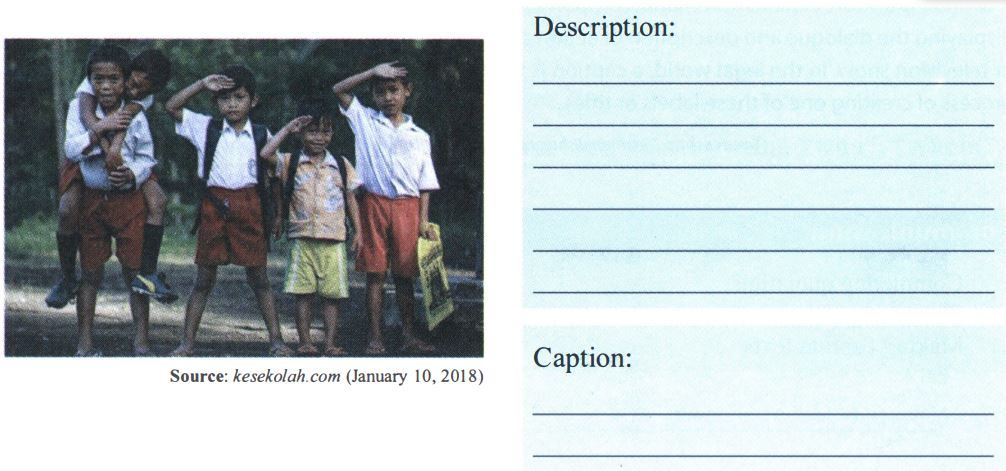
Pembahasan:
1
0.0
Based on the text, what should government do to make reading as habit in Indonesian people?
Pembahasan:
1
0.0
What is the first paragraph about?
Pembahasan:
1
0.0
Task 2: Practice to ask and answer questions.
Still related to the reading text above, play the roles of the speakers in the pictures. Complete the blanks with suitable expressions.
Dialog 1
A: ____ Chihuly Garden and Glass?
B: It is a premier destination for arts, entertainment and favorite sights.
A: ____ at Chihuly Garden and Glass?
B: The Space Needle and Pacific Science Center.
Pembahasan:
2
5.0
Text 2 is for numbers 6-10.
Find suitable imperatives to complete the text. Look at the imperatives in numbers 1-5.
How to Create a Vlog
1. Get a Microphone - To record a video, you need to have a microphone that is compatible with your computer.
2. Get a Webcam - Once you have a microphone, you need to get a webcam that allows you to record video and save it on your computer's hard drive.
3. Prepare Your Vlog Content - Take some time to think about what you're going to say or do during your vlog.
4. Record Your Vlog - Turn on your microphone, start your webcam and begin recording. Save the file when you're done.
5. Upload Your Vlog File to YouTube or Google Video - Upload your vlog file to a site like YouTube or Google Video where you can store it online. Note: See the Tips below to learn an alternate method to insert your video into a blog post.
6. ____the Embedding Code of Your Uploaded Vlog File - Once you upload your vlog file to YouTube or Google Video, copy the embedding code and keep it handy.
7. ____ a New Blog Post - Open your blogging application and create a new blog post. Give it a title and add any text you'd like to introduce your vlog.
8. ____ the Embedding Code for Your Vlog File into Your New Blog Post - Using the embedding code you copied earlier for your uploaded vlog file, paste that information into the code of your new blog post.
9. ____ Your New Blog Post - Select the publish button in your blogging application to send your new blog post with your vlog in it live online.
10. ____ Your Vlog - Open your new live blog post and view your vlog entry to ensure it's working
correctly.
Pembahasan:
1
0.0
36) ____
Pembahasan:
6
0.0
37) ____
Pembahasan:
3
2.0
What should you do to bring out your Gallery photos and Video?
Pembahasan:
27
0.0
38) ____
Pembahasan:
2
0.0

RUANGGURU HQ
Jl. Dr. Saharjo No.161, Manggarai Selatan, Tebet, Kota Jakarta Selatan, Daerah Khusus Ibukota Jakarta 12860
Coba GRATIS Aplikasi Roboguru

Coba GRATIS Aplikasi Ruangguru


Produk Ruangguru
Bantuan & Panduan
Hubungi Kami


Ikuti Kami


©2026 Ruangguru. All Rights Reserved PT. Ruang Raya Indonesia