
Iklan
Pertanyaan
Match the pictures. You will see three group of things: pictures, names and descriptions of Photoshop Tools. Match them. Names: The Brush Tool The Clone Tool Selection Tools Spot Brush Pictures: Description: These tools are one of the most basic functions of Photoshop. They let you directly focus on one area of an image, in any shape that you wish. You can outline an area and then apply different effects to that particular area. Say you have a portrait of a person standing with a house or sky in the background. You can outline objects in rectangular areas, elliptical areas and other ways. This tool lets you select and alter the colors and opacity of different layers. This comes in handy when you have photos with foreground and backgrounds of different color saturation. If you saturate the full image, the foreground may come out oversaturated or vice-versa, so you want to isolate one or the other. You can use this tool over the areas that you'd like to remove in order to bring out the colors of the image to those areas alone. This is a great tool for covering out spots from your photograph. This includes such things as skin blemishes or other small spots around the photograph that you'd rather not include. This tool works great for areas where you can blur the same tone and color onto the spot you'd like to remove (like skin or sky). This tool is used to "duplicate" an area of the image. Imagine you have a photo of a view from a window and one area of the window's edge is cluttered or blurred. You can use this tool to select an area that is crisp and uncluttered, replicate it, and layer it over the original area in order to repair it. ( Source: blog.udemy.com/how-to-use-photoshop ) Selection Tools: ...
Match the pictures.
You will see three group of things: pictures, names and descriptions of Photoshop Tools. Match them.
Names:
- The Brush Tool
- The Clone Tool
- Selection Tools
- Spot Brush
Pictures:
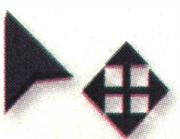
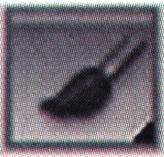
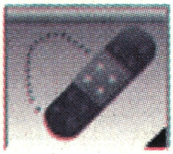
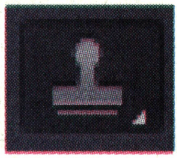
Description:
- These tools are one of the most basic functions of Photoshop. They let you directly focus on one area of an image, in any shape that you wish. You can outline an area and then apply different effects to that particular area. Say you have a portrait of a person standing with a house or sky in the background. You can outline objects in rectangular areas, elliptical areas and other ways.
-
This tool lets you select and alter the colors and opacity of different layers. This comes in handy when you have photos with foreground and backgrounds of different color saturation. If you saturate the full image, the foreground may come out oversaturated or vice-versa, so you want to isolate one or the other. You can use this tool over the areas that you'd like to remove in order to bring out the colors of the image to those areas alone.
-
This is a great tool for covering out spots from your photograph. This includes such things as skin blemishes or other small spots around the photograph that you'd rather not include. This tool works great for areas where you can blur the same tone and color onto the spot you'd like to remove (like skin or sky).
-
This tool is used to "duplicate" an area of the image. Imagine you have a photo of a view from a window and one area of the window's edge is cluttered or blurred. You can use this tool to select an area that is crisp and uncluttered, replicate it, and layer it over the original area in order to repair it.
(Source: blog.udemy.com/how-to-use-photoshop)
Selection Tools: ...


Iklan
N. Puspita
Master Teacher
Jawaban
jawaban yang benar adalah:
Pembahasan


Soal meminta untuk mencocokkan nama" Selection Tools " dengangambar dan deskripsi yang sesuai. Frasa " Selection Tools " apabila diterjemahkan akan menjadi "Alat Pemilihan." Berdasarkan terjemahan tersebut, gambar yang cocok adalah gambar kursor karena kursor berfungsi untuk menunjuk atau memilih sesuatu pada layar komputer saat mengoperasikannya. Berdasarkan terjemahan tersebut juga, kalimat deskripsi yang tepat adalah kalimat deskripsi kedua yang apabila diterjemahkan menjadi "Alat ini memungkinkan Anda memilih dan mengubah warna dan opacity dari lapisan yang berbeda. Ini sangat berguna ketika Anda memiliki foto dengan latar depan dan latar belakang saturasi warna yang berbeda. Jika Anda menjenuhkan gambar penuh, latar depan mungkin menjadi terlalu jenuh atau sebaliknya, jadi Anda ingin mengisolasi satu atau yang lain. Anda dapat menggunakan alat ini pada area yang ingin Anda hapus untuk menonjolkan warna gambar ke area tersebut saja." Jadi, jawaban yang benar adalah: Name: Selection Tools Picture: A cursor Description: This tool lets you select and alter the colors and opacity of different layers. This comes in handy when you have photos with foreground and backgrounds of different color saturation. If you saturate the full image, the foreground may come out oversaturated or vice-versa, so you want to isolate one or the other. You can use this tool over the areas that you'd like to remove in order to bring out the colors of the image to those areas alone.
Soal meminta untuk mencocokkan nama "Selection Tools" dengan gambar dan deskripsi yang sesuai.
Frasa "Selection Tools" apabila diterjemahkan akan menjadi "Alat Pemilihan." Berdasarkan terjemahan tersebut, gambar yang cocok adalah gambar kursor karena kursor berfungsi untuk menunjuk atau memilih sesuatu pada layar komputer saat mengoperasikannya.
Berdasarkan terjemahan tersebut juga, kalimat deskripsi yang tepat adalah kalimat deskripsi kedua yang apabila diterjemahkan menjadi "Alat ini memungkinkan Anda memilih dan mengubah warna dan opacity dari lapisan yang berbeda. Ini sangat berguna ketika Anda memiliki foto dengan latar depan dan latar belakang saturasi warna yang berbeda. Jika Anda menjenuhkan gambar penuh, latar depan mungkin menjadi terlalu jenuh atau sebaliknya, jadi Anda ingin mengisolasi satu atau yang lain. Anda dapat menggunakan alat ini pada area yang ingin Anda hapus untuk menonjolkan warna gambar ke area tersebut saja."
Jadi, jawaban yang benar adalah:
- Name: Selection Tools
- Picture: A cursor
- Description: This tool lets you select and alter the colors and opacity of different layers. This comes in handy when you have photos with foreground and backgrounds of different color saturation. If you saturate the full image, the foreground may come out oversaturated or vice-versa, so you want to isolate one or the other. You can use this tool over the areas that you'd like to remove in order to bring out the colors of the image to those areas alone.


Perdalam pemahamanmu bersama Master Teacher
di sesi Live Teaching, GRATIS!

1
5.0 (4 rating)
Afifah Nur Arida
Pembahasan lengkap banget Mudah dimengerti Bantu banget Ini yang aku cari! Makasih ❤️
Iklan

Pertanyaan serupa

RUANGGURU HQ
Jl. Dr. Saharjo No.161, Manggarai Selatan, Tebet, Kota Jakarta Selatan, Daerah Khusus Ibukota Jakarta 12860
Coba GRATIS Aplikasi Roboguru

Coba GRATIS Aplikasi Ruangguru


Produk Ruangguru
Bantuan & Panduan
Hubungi Kami


Ikuti Kami


©2026 Ruangguru. All Rights Reserved PT. Ruang Raya Indonesia